
Back in December of 2005, I was filling in for Darren Rowse at ProBlogger and I wrote an entry that was very highly read and commented on. The topic was 10 Things You Should Know About WordPress 2.0. The occasion was the release of the much-waited for release of the current major release of WordPress (We’re up to 2.0.7 but the “dot releases” have all been security/bugfix releases).
Tomorrow (January 22, 2007), WordPress 2.1 will be released and it signifies the first major release since the 2.0 branch was launched. As is typical of major releases, they do not only address security/bugfixes but they release new functionality.
So in the spirit of the original article, I give you ten things you should know about WordPress 2.1.
First though, it’s notable to point at the progress the entire WordPress community has made in the last year since 2.0 was released. Many things, such as themes, have been improved upon. For instance, theme authors can take advantage (and now do!) of screenshot.png, a screenshot image that can be included in a theme folder that provides a visual representation of what the theme is. This ability was implemented in 2.0 but since most themes were designed for WordPress 1.5 at the time, most themes did not have this feature implemented.
In addition, the addition of WordPress widgets as an add-on has provided theme authors and bloggers a phenomenal way to simply drag and drop sidebar elements. This takes the mystique out of placing modules in a sidebar when the vast majority of the WordPress users really don’t know how (or want to) mess with the HTML that makes up a sidebar.
Testing has been given serious effort with the release of WordPress.com hosted blogs. You just thought you were getting a free no fuss, no muss blog built on WordPress but what you little guinea pigs may not have known was that it has been the testing bed of most of the WordPress development code. It gives developers a real-time, real-life window into what works and what doesn’t and allows for extensive non-technical testing. Both WordPress 1.5 and 2.0 were plagued with bugs that were not thoroughly vetted out prior to release. While WordPress.com does not guarantee a bug-free release, the chances and scope of bugs are significantly reduced.
So what is new in WordPress 2.1?
Auto-save of Drafts – WordPress 2.1 adds an autosave function that is automatically implemented when writing new drafts. This functionality uses AJAX and operates without new pageloads. The title of the post must be filled out in order for autosaving to occur.
Better Image Upload Handling – If you do any image uploading under the 2.0 branch, you’ve probably been a little frustrated by the confusing menu that becomes available for those images. It was a bit of “back to basics” to implement radio-button style visual prompts assisting in the handling of these images. You can even Edit image attributes after the image is uploaded.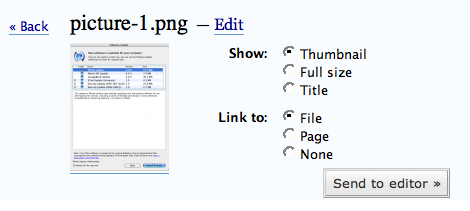
Deprecation of $tableposts, $tablecomments, etc – Deprecation is a mild word. Typically in software development, deprecation means that it is no longer a recommend approach but for backwards compatibility, the function or variable still exists. In this case, elimination would be a more appropriate term. This is going to affect a lot of people because there are still many plugins out there using these variables when generating queries within plugins. Instead, the method for querying wordpress table sis to use the $wpdb global. For instance, $tableposts should be termed $wpdb->posts. $tablecomments should now be $wpdb->comments. And so on. Plugins using the old format will cause SQL errors that might be displayed on a blog or simply break a blog altogether. I had a post recently on the WordPress Development blog which describes these changes.
Update: According to Ryan Boren from WordPress, these variables have been “ressurrected” andplaced in deprecated.php. This is critical as it means that most plugins that may have broke before, will be fine now.
Plugin Compatibility – As mentioned above, many plugins will no longer work in 2.1 due to deprecation of database table variables. However, whenever there is a new version of WordPress, the other possible “plugin breaks” extend farther. Fortunately, the WordPress community has been hard at work testing plugins with 2.1 determining compatibility. You can find a list of backwards-compatible plugins at the Codex.
Native WordPress Migration Functionality – I unequivocally can say that when I released the WordPress-to-Wordpress migrator, I had no idea that it would bring me as much traffic or that the tool would recieve such warm welcome. So, it’s with mixed emotions that I say goodbye to the vast amount of traffic I recieved. The WordPress migration tool was released to essentially mirror functionality that is in WordPress 2.1 (and thus WordPress.com). So while the 2.0 branch will remain available through 2010 (it is available in Debian Linux now) , the new 2.1 branch introduces the functionality that I provided to 2.0 customers with my tool.
MySQL Version – It should be noted that although most hosting providers have upgraded their MySQL version to 4.0+, many are still lingering at MySQL 3.23. WordPress 2.1 eliminates support for this older version of MySQL. An easy way to determine what version you are running is to drop this in a file called testdb.php and drop inside your web root:
< ?php
// Replace with your database connection info
mysql_connect("localhost","dbuser","dbpassword");
echo mysql_get_server_info();
?>
New Visual Editor Interface – A big problem (to many) in the WordPress 2.0 branch was the Rich Text Editor (RTE) powered by TinyMCE. I believe the RTE was a good idea but was before it’s time. Thankfully, the developers have heeded the concerns brought to bear on the RTE in WordPress 2.0 and have significantly improved it. Notably, there is now a tabbed interface in the Write screen that will allow bloggers to switch between the two views seamlessly.
Merging of Links and Categories – This is another one of those things that tend to be more of a backend database thing, but there are notable semantics to be pointed out. In previous versions of WordPress, links and categories were handled as two separate entities. Links were seen as a thing used solely to power a blogroll and Categories were seen as a way to solely compartmentalize posts. In WordPress 2.1, the development philosophy shifted in such a way to recognize that these things actually tend to serve nearly similar purposes. While those philosophies can be discussed in other posts, the important thing to recognize is that the Categories table is now prepopulated with a Blogroll category and all links are assigned, by default, to the blogroll category. Folks who are upgrading will have this association made as part of the upgrade process.
Privacy Features – Probloggers will not find this feature particularly useful, nor will most bloggers who desire exposure. However, in WordPress 2.1, there are privacy features which allow you to block your site from search engines and directories. This is useful, however, if you were to want to keep a blog for family or friends or a purely personal blog intended for your own self.
Nonces – This is not really new in WordPress 2.1 but it is new since the original WordPress release. In fact, nonces were introducted in WordPress 2.0.3 and they are significant security items. It applies not only to WordPress but plugins so plugin authors take note of nonces. Mark Jaquith [fixed typo. Sorry Mark!] has more on nonces and how to use them. He details the specific implementation in a way my grandmother (who is dead) could understand. In a nutshell, nonces are unique “passwords” embedded in the comment moderation emails, among other things that prevent YOU from damaging YOUR blog. Each request is assigned a nonce which only lets ONE person do ONE thing within your wp-admin (i.e. approve a comment or delete a post). This replaces the “Are you sure?” dialog.