
Technosailor.com Readers! Donate today to assist the VIDA/COADHA Haiti Medical Response in their efforts.

21 January 2007 243 Comments

10 Things You Should Know About WordPress 2.1

Back in December of 2005, I was filling in for Darren Rowse at ProBlogger and I wrote an entry that was very highly read and commented on. The topic was 10 Things You Should Know About WordPress 2.0. The occasion was the release of the much-waited for release of the current major release of WordPress (We’re up to 2.0.7 but the “dot releases” have all been security/bugfix releases).

Tomorrow (January 22, 2007), WordPress 2.1 will be released and it signifies the first major release since the 2.0 branch was launched. As is typical of major releases, they do not only address security/bugfixes but they release new functionality.

So in the spirit of the original article, I give you ten things you should know about WordPress 2.1.

First though, it’s notable to point at the progress the entire WordPress community has made in the last year since 2.0 was released. Many things, such as themes, have been improved upon. For instance, theme authors can take advantage (and now do!) of screenshot.png, a screenshot image that can be included in a theme folder that provides a visual representation of what the theme is. This ability was implemented in 2.0 but since most themes were designed for WordPress 1.5 at the time, most themes did not have this feature implemented.

In addition, the addition of WordPress widgets as an add-on has provided theme authors and bloggers a phenomenal way to simply drag and drop sidebar elements. This takes the mystique out of placing modules in a sidebar when the vast majority of the WordPress users really don’t know how (or want to) mess with the HTML that makes up a sidebar.

Testing has been given serious effort with the release of WordPress.com hosted blogs. You just thought you were getting a free no fuss, no muss blog built on WordPress but what you little guinea pigs may not have known was that it has been the testing bed of most of the WordPress development code. It gives developers a real-time, real-life window into what works and what doesn’t and allows for extensive non-technical testing. Both WordPress 1.5 and 2.0 were plagued with bugs that were not thoroughly vetted out prior to release. While WordPress.com does not guarantee a bug-free release, the chances and scope of bugs are significantly reduced.

So what is new in WordPress 2.1?

Auto-save of Drafts – WordPress 2.1 adds an autosave function that is automatically implemented when writing new drafts. This functionality uses AJAX and operates without new pageloads. The title of the post must be filled out in order for autosaving to occur.

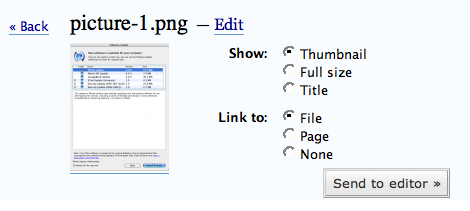
Better Image Upload Handling – If you do any image uploading under the 2.0 branch, you’ve probably been a little frustrated by the confusing menu that becomes available for those images. It was a bit of “back to basics” to implement radio-button style visual prompts assisting in the handling of these images. You can even Edit image attributes after the image is uploaded.picture-3.png
Deprecation of

1
$tableposts

,

1
$tablecomments

, etc – Deprecation is a mild word. Typically in software development, deprecation means that it is no longer a recommend approach but for backwards compatibility, the function or variable still exists. In this case, elimination would be a more appropriate term. This is going to affect a lot of people because there are still many plugins out there using these variables when generating queries within plugins. Instead, the method for querying wordpress table sis to use the

1
$wpdb

global. For instance,

1
$tableposts

should be termed

1
$wpdb->posts

.

1
$tablecomments

should now be

1
$wpdb->comments

. And so on. Plugins using the old format will cause SQL errors that might be displayed on a blog or simply break a blog altogether. I had a post recently on the WordPress Development blog which describes these changes.

Update: According to Ryan Boren from WordPress, these variables have been “ressurrected” andplaced in deprecated.php. This is critical as it means that most plugins that may have broke before, will be fine now.

Plugin Compatibility – As mentioned above, many plugins will no longer work in 2.1 due to deprecation of database table variables. However, whenever there is a new version of WordPress, the other possible “plugin breaks” extend farther. Fortunately, the WordPress community has been hard at work testing plugins with 2.1 determining compatibility. You can find a list of backwards-compatible plugins at the Codex.

Native WordPress Migration Functionality – I unequivocally can say that when I released the Wordpress-to-Wordpress migrator, I had no idea that it would bring me as much traffic or that the tool would recieve such warm welcome. So, it’s with mixed emotions that I say goodbye to the vast amount of traffic I recieved. The Wordpress migration tool was released to essentially mirror functionality that is in WordPress 2.1 (and thus WordPress.com). So while the 2.0 branch will remain available through 2010 (it is available in Debian Linux now) , the new 2.1 branch introduces the functionality that I provided to 2.0 customers with my tool.

MySQL Version – It should be noted that although most hosting providers have upgraded their MySQL version to 4.0+, many are still lingering at MySQL 3.23. WordPress 2.1 eliminates support for this older version of MySQL. An easy way to determine what version you are running is to drop this in a file called

1
testdb.php

and drop inside your web root:

1
2
3
4
5
< ?php
// Replace with your database connection info
mysql_connect("localhost","dbuser","dbpassword");
echo mysql_get_server_info();
?>

New Visual Editor Interface – A big problem (to many) in the WordPress 2.0 branch was the Rich Text Editor (RTE) powered by TinyMCE. I believe the RTE was a good idea but was before it’s time. Thankfully, the developers have heeded the concerns brought to bear on the RTE in WordPress 2.0 and have significantly improved it. Notably, there is now a tabbed interface in the Write screen that will allow bloggers to switch between the two views seamlessly.
picture-4.png

Merging of Links and Categories – This is another one of those things that tend to be more of a backend database thing, but there are notable semantics to be pointed out. In previous versions of WordPress, links and categories were handled as two separate entities. Links were seen as a thing used solely to power a blogroll and Categories were seen as a way to solely compartmentalize posts. In WordPress 2.1, the development philosophy shifted in such a way to recognize that these things actually tend to serve nearly similar purposes. While those philosophies can be discussed in other posts, the important thing to recognize is that the Categories table is now prepopulated with a Blogroll category and all links are assigned, by default, to the blogroll category. Folks who are upgrading will have this association made as part of the upgrade process.

Privacy Features – Probloggers will not find this feature particularly useful, nor will most bloggers who desire exposure. However, in WordPress 2.1, there are privacy features which allow you to block your site from search engines and directories. This is useful, however, if you were to want to keep a blog for family or friends or a purely personal blog intended for your own self.

Nonces – This is not really new in WordPress 2.1 but it is new since the original WordPress release. In fact, nonces were introducted in WordPress 2.0.3 and they are significant security items. It applies not only to WordPress but plugins so plugin authors take note of nonces. Mark Jaquith [fixed typo. Sorry Mark!] has more on nonces and how to use them. He details the specific implementation in a way my grandmother (who is dead) could understand. In a nutshell, nonces are unique “passwords” embedded in the comment moderation emails, among other things that prevent YOU from damaging YOUR blog. Each request is assigned a nonce which only lets ONE person do ONE thing within your wp-admin (i.e. approve a comment or delete a post). This replaces the “Are you sure?” dialog.

Pick up your copy of the WordPress Bible, a wildly popular resource for beginners and experts alike.

Popularity: 5% [?]

243 Responses to “10 Things You Should Know About WordPress 2.1”

  1. Aaron Brazell 23 January 2007 at 3:29 pm #

    You probably have the option set on your profile page to not use the Visual Text Editor.

  2. CIO Jerry 23 January 2007 at 3:52 pm #

    I thought of that too, so I checked all the options under the Admin’s dashboard, esp. options/writing. Can you be more specific on where this ‘profile page’ is?

  3. CIO Jerry 23 January 2007 at 4:22 pm #

    shame on me. I missed it. Thanks, Aaron. I skipped the whole option/users tab, thinking it is for user account management.
    Anyhow, I was using Visual Text Editor before the upgrade. So, the upgrade somehow took it away. Hate to think it could be caused by a reset to default because I’d think most people would want Visual Editor. Otherwise why use a CMS at first place :)

  4. Keanen 23 January 2007 at 5:59 pm #

    Postie does work after a couple of mods to the code…

    http://keanen.com/blog/2007/01/23/get-postie-to-run-on-wordpress-21/

  5. HardinComp 24 January 2007 at 2:58 am #

    I just upgraded to WP 2.1 and I was pleasantly surprised that none of my 2.0.7 plugins broke that I couldn’t find updates to WP 2.1 versions. Even with the little bit that I’ve checked out in 2.1 I’m even happier than New Orleans Saints fans are this week.

    Thanks for bringing me into the WP family. I can;t believe it took me so long to use this killer software/

  6. me 25 January 2007 at 5:12 pm #

    the new version still not support. “real” source code editing.
    eg. you can not embed a youtube video.

    • Aaron Brazell 25 January 2007 at 5:36 pm #

      Sure you can. Make sure you’re in standard mode and not using the RTE.

  7. Indigo 28 January 2007 at 5:54 am #

    Thanks for a useful post – I will be upgrading the indigo t-shirt blog this weekend but am still worried about plugins not working.

  8. adam s. 18 February 2007 at 1:19 pm #

    The advanced toolbars and buttons in the TinyMCE editor of Wordpress 2.1 can be changed and customized as you like. See the article at http://timrohrer.com/blog/?p=29 for details.

  9. Nishanthe 28 June 2007 at 12:14 pm #

    Hi,
    Nice Top Ten List and frankly this is useful. Thank you for taking time to blog this :)
    -Nish

  10. Jonathan D. 19 August 2007 at 8:38 pm #

    Aaron, you could probably do some more updating on this list as more features have been released. Might even start prepping your next article that includes the new Tags feature in Wordpress.

    Great write-ups though, looking forward to more of them.

  11. Grosshandel 28 September 2007 at 7:20 am #

    Anyhow, I was using Visual Text Editor before the upgrade.

  12. Tarife 2 October 2007 at 4:00 pm #

    @Grosshandel: Yea I was using Visual Text Editor, too.

  13. Tim Shadoz 15 November 2007 at 2:15 pm #

    And after all this development, there is STILL no Postgres support, denying one of the best pieces of blogging software even more active users who would prefer PostgreSQL instead of MySQL for whatever reasons.

  14. Alex Mainz 21 November 2007 at 7:16 pm #

    Although i’m using wordpress 2.3 now, this is still great information. Its fascinating how fast things like features and / or bugs can change in the short period of time, that a new version is developed. Thanks, Aaron!

  15. MikeQue 24 January 2007 at 9:04 am #

    Thanks! We have been going nuts thinking something was wrong with the PHP or had misinstalled.

    This is definitely a usability bug, that this is set to default inWP2.1 and is buried so deep in the UI.

  16. Aaron Brazell 25 January 2007 at 5:35 pm #

    What usability bug are you referring to, MikeQue? Your comment does not make apparent sense because it might be out of context…


Trackbacks/Pingbacks.

  1. cb.blog » Blog Archive » Wordpress 2.1 Upgrade - 27. Jan, 2007

    [...] last night. I probably should have done a bit more research, as the upgrade involved quite a few fundamental changes to the back end, including template tags and other gotchas. So, I’ve spent most of last night [...]

  2. WordPress 2.1 heading our way tomorrow -- Brandon Wood - 27. Jan, 2007

    [...] After several recent security fixes, WordPress 2.1 is going to be released to the public tomorrow. Technosailor has a great overview of the updates made in the new version – 10 things you should know about WordPress 2.1. [...]

  3. 10 Things You should Know About WordPress 2.1 - Knuts blogg - Technoscience - 27. Jan, 2007

    [...] 2.1 of Wordpress will be released january 22.This article describes ten things to know about the new [...]

  4. E.Webscapes Blog Design Studio - 27. Jan, 2007

    Odds N’ Ends…

    ……

  5. Working at Home on the Internet - 28. Jan, 2007

    [...] 10 Things You should Know About WordPress 2.1 by Aaron Brazell… Aaron gives some good insight into what to expect from the latest upgrade from WordPress, but I think he (they) missed some of the finer points. [...]

  6. TZG2.0 | FASTER, INTERNET! KILL! KILL! - 28. Jan, 2007

    [...] is a pretty exhaustive summary over at Technosailor, but be prepared to be underwhelmed, because all in all, this was not the day [...]

  7. Wordpress 2.1 è tra noi at lalui vers. 2.0 - 28. Jan, 2007

    [...] Proprio per questo molti bloggers prima di fare l’aggiornamento dovrebbero provare ad aggiornare una versione di test del proprio blog e leggere questo piccolo memorandum. [...]

  8. Around the web | alexking.org - 28. Jan, 2007

    [...] 10 Things You should Know About WordPress 2.1 [...]

  9. What I now know about Wordpress 2.1 | Sirius Stuff - 28. Jan, 2007

    [...] 10 Things You should Know About WordPress 2.1 » Technology, Blogging and New Media is a good summary of key changes. Merging of Links and Categories […] While those philosophies can be discussed in other posts, the important thing to recognize is that the Categories table is now prepopulated with a Blogroll category and all links are assigned, by default, to the blogroll category. [...]

  10. danvk.org » WordPress 2.1 - 29. Jan, 2007

    [...] biggest annoyances with wp: the “Save and Continue Editing” button now works and the bizarre image insertion interface from the old WordPress is much [...]

  11. My Stuff :: wordpress 2.1 - 31. Jan, 2007

    [...] 10 Things You Should Know About WordPress 2.1 Some WordPress 2.1 Gotchas [...]

  12. Weekly Brief - 31. Jan, 2007

    [...] has posted 10 Things You should Know About WordPress 2.1.Found via [...]

  13. BlogAjuda » 9 coisas que você deveria saber sobre o WordPress 2.1 - 31. Jan, 2007

    [...] simples e até irrelevantes, outras importantes e obscuras. Tomei a liberdade de, com base no seu artigo, publicar aqui uma tradução livre da lista. Vamos [...]

  14. All Spin Zone » ASZ Upgrade - Wordpress 2.1 - 31. Jan, 2007

    [...] today, I pushed a button to upgrade All Spin Zone to the newest major release of Wordpress, version 2.1. For those of you who use Wordpress as your own blog platform, I’m pleased to report that the [...]

  15. Wordpress autosaving (at wongaBlog) - 01. Feb, 2007

    [...] anybody confused by Wordpress’ clever new autosave system, apparently it only works if the title is filled in. Makes sense – I couldn’t work out why it was so [...]

  16. Quick Links - 02 February 2007 | Isaak’s World - 02. Feb, 2007

    [...] 10 Things You Should Know About Wordpress 2.1 and the follow-up: Wordpress 2.1 [...]

  17. Fixmood » Blog Archive » WordPress 2.1 is out - 02. Feb, 2007

    [...] new version comes feature packed with several new additions. Technosailor gives you some detail while the WordPress Blog release post just lists them out for quick [...]

  18. Nirlog.com » Blog Archive » List of Blogging Checklists - 02. Feb, 2007

    [...] 10 Things You should Know About WordPress 2.1 – If you’re planning to upgrade your blog to Wordpress to 2.1 here’re 10 things you [...]

  19. Salatti.NET » Last 15 days recap - 04. Feb, 2007

    [...] WordPress 2.1 has been released. Here is the Plugin Compatibility List, and 10 things you should know about WP 2.1. [...]

  20. Perfect Blogger - 08. Feb, 2007

    WordPress 2.1…

    It’s been a bit over two weeks since the release of the long awaited WordPress 2.1, codenamed Ella, and although I had upgraded one of my blogs the very next day when it became available, it’s only now that I finally have some time to post …

  21. sYoKz bLoG » Blog Archive » 10 Things You should Know About WordPress 2.1 - 09. Feb, 2007

    [...]  link Bookmark to: [...]

  22. Froutopia » Hello Ella - 11. Feb, 2007

    [...] 2: Well, it looks like the category merge is a new feature after all and it had another effect: it changed the id of the categories, so I had to rewrite my sidebar for [...]

  23. mhinze.com » Blog Archive » links for 2007-01-29 - 19. Feb, 2007

    [...] 10 Things You should Know About WordPress 2.1 » Technology, Blogging and New Media (tags: wordpress) [...]

  24. Listerate » Blog Archive » 10 Things You should Know About WordPress 2.1 - 26. Feb, 2007

    [...] 10 Things You should Know About WordPress 2.1 » Technnosailor Mostly fluff, but what’s the harm in reading it anyway? Oh, and WordPress 2.1.1 is now out. [...]

  25. The Digg Bury Effect » Technology, Blogging and New Media - 28. Feb, 2007

    [...] That article made the Digg front page and within 10 minutes was off the front page. Every other time a story has hit the front page, the story has stayed there for a significant amount of time. [...]