
Technosailor.com Readers! Donate today to assist the CHF International Haiti Relief in their efforts.

18 April 2007 9 Comments

WordPress Plugin: Embargo Press Release

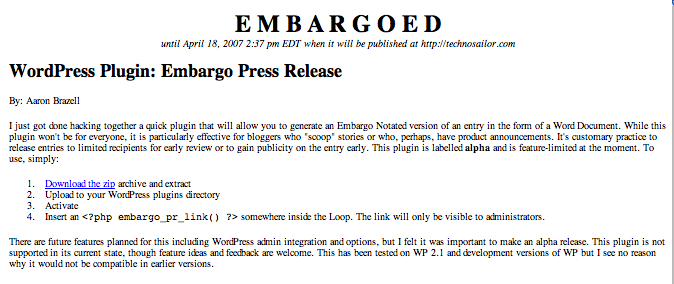
I just got done hacking together a quick plugin that will allow you to generate an Embargo Notated version of an entry in the form of a Word Document. While this plugin won’t be for everyone, it is particularly effective for bloggers who “scoop” stories or who, perhaps, have product announcements.

It’s customary practice to release entries to limited recipients for early review or to gain publicity on the entry early. This plugin is labelled alpha and is feature-limited at the moment. To use, simply:

  1. Download the zip archive and extract
  2. Upload to your WordPress plugins directory
  3. Activate
  4. Insert an
    1
    <?php embargo_pr_link() ?>

    somewhere inside the Loop. The link will only be visible to administrators.

There are future features planned for this including WordPress admin integration and options, but I felt it was important to make an alpha release.

This plugin is not supported in its current state, though feature ideas and feedback are welcome. This has been tested on WP 2.1 and development versions of WP but I see no reason why it would not be compatible in earlier versions.

Screenshots
picture-2.png

Pick up your copy of the WordPress Bible, a wildly popular resource for beginners and experts alike.

Popularity: 2% [?]

9 Responses to “WordPress Plugin: Embargo Press Release”

  1. Amanda 18 April 2007 at 4:27 pm #

    i’m so jealous i wish i could right my own hacks it’d be easier but then again i can barely edit a free theme so i have a long way to go.

  2. Aaron Brazell 18 April 2007 at 4:47 pm #

    Maybe someday! Welcome!

  3. Gary King 18 April 2007 at 5:29 pm #

    What’s the Embargo Notated format for?

  4. Aaron Brazell 19 April 2007 at 10:52 am #

    Gary, I don’t know if I understand the question… sorry.

  5. Lorin Rivers 27 April 2007 at 8:32 pm #

    I’d also like to a have time-bomb feature, where you could put a “hide after date” on a post.

  6. Paul 28 May 2007 at 10:54 am #

    Hi – I know it is not supported so maybe i won’t get a response. I followed the intstructions – activated ok – placed the code in the loop – showed up to administrators on the posts – clicked – nothing. This is on 2.2. Any ideas anyone? Thanks.

  7. Manfred 3 November 2007 at 3:25 pm #

    Dear Aaron,
    I’m looking for a plug-in or possibly another method to modify Word Press’s functionality that does the following:
    Depending on the Category of a post, a post is automatically delayed with a given amount of days.
    Background: I’m maintaining a blog that republishes articles from a newspaper and from a magazine. Due to agreements with the publishers, the articles should not appear on the same day as in the print publication. In this case it means that every article from the newspaper should be embargoed for 2 days, while the magazine articles can only be put online with a delay of three weeks.
    I know that I can edit the timestamp of each post (that’s exactly what I’m doing right now), but it would be much easier to tag an article as ‘magazine’ or ‘newspaper’ and have word press calculate the time stamp for me.
    Would you have any suggestions for me how to tackle this? Do you know of any existing plugin that already does this?
    Thanks
    Manfred

  8. Matthias Willerich 17 March 2008 at 5:39 am #

    It might help to explain to the audience what an Embargo Notation might be used for:
    http://en.wikipedia.org/wiki/Journalism_sourcing#Embargo

  9. Matthias Willerich 17 March 2008 at 5:41 am #

    oops, didn’t mean to sound harsh, just a premature submit. Thanks for the plug-in release, it’ll come in very handy for me soon.