
Technosailor
  • Home
  • Blog
  • Venture Files
  • Espanol
  • Technosailor Staff
  • Twitter Pitch Me!
Sep
20
2007

10 Things You Need to Know About WordPress 2.3

Posted by: Aaron Brazell

We have a tradition around these parts of publishing information for the WordPress community surrounding a new major release of WordPress. With WordPress 2.3 to be released on September 24, 2007, I think it’s appropriate to follow the tradition and let you know about the ten things I think you should know about WordPress 2.3. There’s a lot under the hood that I can’t cover in this article, so particularly if you’re a developer, you should go look at the code and figure out what new hooks and functionality you can find.

Tags

Yes, tags have arrived. They have been a long time in coming and, in my humble opinion, are not perfect - but they are good. Tagging in WordPress is ad hoc and the UI presented demonstrates that. In fact there is very little UI, just a form field below the write screen area that takes a comma separated list. The methodology does reinforce the concept that tags are not hierarchal.

Observant users may notice that there is no way to edit those tags, manage a list of tags, or delete tags. I will point out that, there are already plugins that add management tools to WordPress for tagging and the development team has purposefully taken a “wait and see” approach to tags in this release. It does not make a lot of sense to add tons of UI that is later discovered to be superfluous or rarely used. Instead, they have opted to wait and see what plugins become popular with an open mind about possible integration in future releases.

Added: I was also notified about another plugin for managing tags called ClickTags. I have no first hand experience with either of these so anyone who can provide further input, I’d love to hear it.

Let me share some of the in-built changes that tags bring to the table.

  1. Terms Table - For developers, there is a new table called wp_terms. This table is a lookup table of sorts that shares terms between categories, tags and bookmarks. In previous releases, the wp_categories table was shared between categories and bookmarks and this table was the crux of the new development approach that was taken after tags were dropped for WordPress 2.2 and rebuilt from the ground up for WordPress 2.3.
  2. New Tag and Terms API - Plugin developers will appreciate new API that inevitably comes with a new feature this large. Take a look at the new wp-includes/taxonomy.php for lots of new API functionality. Note that the new API probably effects more than tags, but I don’t know for sure. It probably interacts with category and links/bookmarks/blogroll API as well. If your plugins interact with this API, make sure your plugins still function as expected.
  3. New Template Tags - There are not a tremendous amount of new template tags dealing with tagging, however theme designers should be aware of them and adjust themes as necessary. Bloggers, feel free to hack your themes to use these functions, however, you may want to wait and see if your theme gets an update for WordPress 2.3 before you upgrade. There may not be a lot of documentation at first, so be sure to refer to wp-includes/category-template.php to see what arguments can be passed to these tags (though all should work without any arguments whatsoever):
    • wp_tag_cloud()
    • get_tag_link()
    • get_the_tags()
    • get_the_tags_list()
  4. Tag Importers
    • Ultimate Tag Warrior
    • Jerome’s Keywords
    • Simple Tags
    • Bunny’s Technorati Tags
    • WordPress categories

I have been running WordPress 2.3 on this blog since pre-2.2 when 2.3 was supposed to be 2.2 and was branched to nuke the original tag concept and still hit the release milestone dates. I will tell you from first hand experience that importing WordPress categories does not associate those tags with entries that previously had the identical category. I think that will be a common question so I’d like to answer that here.

Feel free to gripe or complain or praise and adore the new tags functionality. If your voice is not heard then WP devs will be left to assuming what the community wants. As this is a community resource, I do invite you to express your opinions on the tagging feature here. Please keep it respectful though as the people doing this stuff by and large are volunteers devoting their time and energy to make WordPress better for everyone. If you behave respectfully, chances are your voice will be heard and not ignored.

Update Notifications


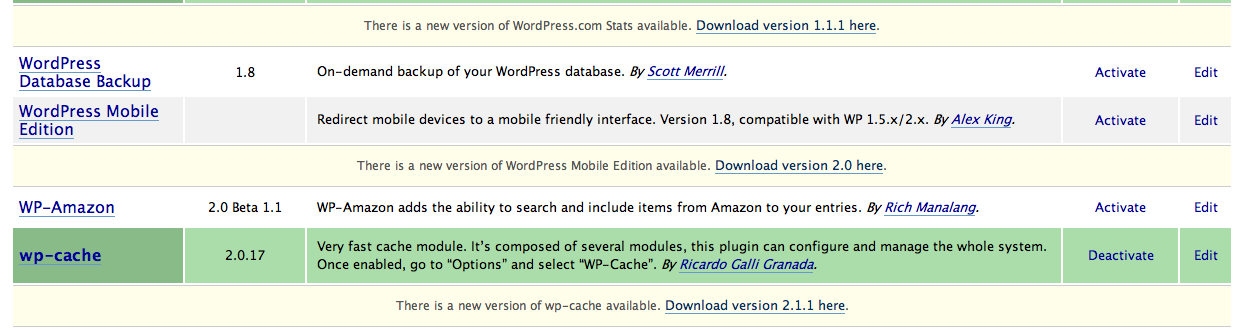
Update notifications have been a long requested feature of WordPress and thankfully in this release, it’s been delivered - not once, but twice. Now WordPress can alert you when a new version of WordPress is available as well as new plugin versions. I find the plugin update, particularly, very HAWT.
Canonical Redirection

This has long been a bane of every webmasters existence. Canonical URLs are treated differently by Google and the search engines meaning the www. version of a site is considered to be a different page than the non-www version. Search engines see two different pages and penalize one as duplicate content.

To fix this, many webmasters and bloggers, including myself, have taken steps to redirect one version to another. In my case, I redirect www versions of my URLs to non-www versions. Now, WordPress handles this internally based on the value you set as your website site URL under the Options > General page. In essence, this means instant SEO benefits to WordPress 2.3 users.

Post Workflow Improvements

Two more often requested features is better draft management functionality as well as a better editorial workflow for non-Editor, non-Administrator writers. While the second is amazingly better, the first is a step in the right direction but still not “great”.

Draft Management is improved by adding a series of dropdown menus on top of the blog’s Manage page. From this list, you can quickly select posts that are in draft status. This does not do away with links to draft posts that has traditionally been located at the top, but this too has received some TLC. If you’re a blogger that keeps lots of posts in draft for a rainy day, or simply start posts and save them to draft to work on later, you’ll be familiar with “Draft Hell” where multiple levels of links can crowd the top of the page and become unwieldly. Some smart massaging happens to this list now and displays two drafts and adds an “and more…” link to the end leading the blogger to a page listing draft posts. Aesthetically this is great, however I still think the management of drafts can be a bit unwieldly and ugly.

The second bit that pertains to workflow management has to do with “pending review” posts. These are great for multi-author blogs where “Author” level bloggers do not have the rights to publish an entry without a review. Unfortunately, in previous iterations of WordPress, an Administrator or Editor had to pay close attention to when blogs were ready for review but now, they are notified. This is an excellent editorial workflow item that is long overdue.

Pluggable Dashboard

If you’re pretty tired of getting all the stock WordPress and Technorati links on your WordPress dashboard and want to make it more useful for you, the dev team has made the WordPress dashboard customizable via several new plugin hooks.

We’ve been using this at b5media already to provide bloggers with feeds that are more relevant to them as well as replacing Technorati results with Google Blog Search results under Incoming Links. So far, no complaints!

$wpdb->prepare()

A feature that will only make hardcore developers giddy, there is a not-yet-used-yet-still-functionally-solid method added to the database class. the prepare() method is a handy little method that can be used to nuke SQL injection hacks before they become an issue by creating safe SQL code. Like I said, it’s not in use yet in WordPress because the devs ran out of time prior to release of WordPress 2.3. The feature is officially slated for WordPress 2.4 but I thought I’d point it out as the code is in place (and subject to possible modification in advance of its official support in WordPres 2.4.

Atomlib

Atomlib is a relatively late addition to the WordPress 2.3 codebase. It was created by none other than the great Sam Ruby who was influential in creating the Atom feed specification and the Atom Publishing Protocol. Atomlib provides a support library to the Atom products supported by WordPress - the Atom Publishing Protocol and the Atom 1.0 feed. As it is a self contained library, the potential for its application in other ways is there if a developer wanted to sling some code to create new functionality or plugins.

Deprecated Functions

Not a significant issue as I have not seen the two functions that have been deprecated in widespread use in the community. Yet, as a new release comes along and deprecates some functionality, I feel it necessary to point them out. In the case of WordPress 2.3, only two functions have been deprecated - and they both relate to permalinks. The first one, template tag permalink_link() has been deprecated in favor of the_permalink(). I believe most usage examples as well as most theme designers already use the_permalink() so I doubt this will have much effect. Additionally, permalink_single_rss() has been deprecated in favor of the_permalink_rss().

As usual with deprecation, the functions still work and are available. However, it is advised that the new format be used as deprecated functions will eventually be removed from the core.

Multiple Category Widgets

With the advent of tags and terms, the possibility has been introduced to have different “groups” of categories organized in different ways. To that end, the Categories widget has been expanded to allow multiple category widgets. Though these widgets are not overly useful, someone may be able to find some uses for multiple category widgets.

Pluggable RSS Library

A common complaint in the WordPress development community has surrounded the inclusion and forced use of Magpie as an RSS parsing library. We at b5media, for instance, find a much better and supported library (Magpie stopped being developed awhile ago) in SimplePie. There may be other RSS parsing libraries available. The point is, WordPress is all about being extensible and offering the user choice.

To that end, there is a new plugin hook called load_feed_engine which allows plugin authors to load a different feed parsing engine if they so choose. I find this very interesting and useful. Others will not, but again, it’s about choice.

WordPress 2.3 brings us a lot of good things. It’s certainly not perfect. I’d personally recommend that everyone wait before rushing right out and upgrading. There may be breakage so make sure you back stuff up. With a new version, it’s usually wise to wait a few weeks and let plgin authors catch up and update their plugins. Of course, the fewer plugins you use, the better off you’ll be - but that’s a matter of choice. Overall, this is a very solid release in my opinion.

Also, I’d love it if you Dugg this article if you find it useful.

  • Add to Mixx!
  • Stumble it!
About the Author: Aaron Brazell is the lead editor of Technosailor.com and a social media expert. His passion is to see companies and individuals use the internet and web technologies wisely and effectively to promote their brands and companies. He served as Director of Technology at b5media from 2005-2008 and is currently an independent consultant.
Tagged: at 7:35 am -

81 Responses to “10 Things You Need to Know About WordPress 2.3”

  1. 1
    eyeflare.com Says:

    Very nice roundup of WP 2.3 changes. I’m looking forward to updating my themes.

    September 20th, 2007 at 8:09 am
  2. 2
    Karthik Kastury Says:

    Hi Aaron,

    There is only one thing that is holding me back from Tags in 2.3 and thats the tag clouds feature. Apparently 2.3 doesn’t support colored tag clouds like UTW does which i must have.

    So I was just wondering if there is any plugin that does this. If it does then there is nothing holding me back from installing 2.3 on my blog..

    September 20th, 2007 at 9:13 am
  3. 3
    Adam Dempsey Says:

    Thanks for the list! Looking forward to installing it now!

    September 20th, 2007 at 9:32 am
  4. 4
    Knox Says:

    So, does that mean if we are using plugins for tagging and canonical redirects that 2.3 will make the use of these plugins redundant?

    September 20th, 2007 at 9:48 am
  5. 5
    Lara Kulpa Says:

    Aaron - as always, thanks for this!

    I was already intending to wait on the upgrade, mainly because all of my themes are pretty much my own creation. So it’s going to be a little bit of a learning system for me to change them up and have them ready for a proper upgrade. (At least that’s what I’m thinking based on all I’ve read about 2.3)

    There are soooo many things I could list out that I’d like to see - none of which are likely to be on any majority list, but maybe someday I’ll write them all out somewhere. In the meantime, I think the WP devs are doing an amazing job, and never have I ever witnessed any software, open source or not, that had this much constant, consistent, great work put into it.

    September 20th, 2007 at 10:24 am
  6. 6
    Rob Witham Says:

    Thanks for the thoughtful and thorough update. I am particularly pleased to see tags being integrated. I have considered adding a plugin to achieve this but I try to use the fewest plugins possible. Great news. WordPress is becoming better all the time!

    September 20th, 2007 at 10:55 am
  7. 7
    TiVoBlog Says:

    I look forward to the update notification feature and the ability to review a post before it is published. These are two great additions to an already wonderful product.

    September 20th, 2007 at 12:24 pm
  8. 8
    Terry Ng Says:

    Thanks for the update. Another round of checking to see if any plugins will break. :p

    September 20th, 2007 at 12:44 pm
  9. 9
    Pity Says:

    Thanks for the full blown article, it gave a good overview. Its a pity though that you choose to keep the link to Wordpress on the footer as a nofollow.

    September 20th, 2007 at 1:38 pm
  10. 10
    Jim Says:

    So I was just wondering if there is any plugin that does this. If it does then there is nothing holding me back from installing 2.3 on my blog..

    Karthik, I know I haven’t seen one that does - yet. But I’m fairly certain someone will develop one that does just that relatively soon. Keep an eye out on WLTC, since I’ll be compiling lists of tagging plugins for 2.3 as I come across them.

    September 20th, 2007 at 2:53 pm
  11. 11
    Mike Steinbaugh Says:

    It is also important to note that the new canonical redirection engine also fixes the problem of trailing slashes. For example, this URL without the trailing slash (http://technosailor.com/10-things-you-need-to-know-about-wordpress-23) will now redirect to the proper URL (http://technosailor.com/10-things-you-need-to-know-about-wordpress-23/) in WordPress 2.3. This also helps to eliminate search engine cruft.

    I’ve heard that redirects will occur for post abbreviations as well (i.e. /10-things-youneed-to-know-about-wordpress) to the proper URL (/10-things-you-need-to-know-about-wordpress-23/).

    September 20th, 2007 at 4:31 pm
  12. 12
    Logan Says:

    Very nice post. Thank You for gathering up and explaining your information.
    cheers

    September 20th, 2007 at 6:01 pm
  13. 13
    subcorpus Says:

    nothing about security … ???
    that puts me off a bit …
    since my blog can be hacked into very easily …
    but i will make sure i upgrade …
    thanks for sharing this …
    appreciated …

    September 20th, 2007 at 8:17 pm
  14. 14
    Cary Real Estate Says:

    very nice list. i took the jump to run my entire real estate website on wordpress. while i look forward to new functionality, im shaking in my boots thinking about upgrading to 2.3. i will definitely head the advice and hang for a couple of weeks before attempting an upgrade. especially as i have been bulking up on the plugins.

    one thing that definitely is nice is the canonical redirection. instant SEO sounds good to me :)

    September 20th, 2007 at 8:22 pm
  15. 15
    Kyle Says:

    Good to know.

    I fear the day where Wordpress becomes hard to use. I believe that too many additions to the CMS will ultimately be detrimental. That’s definitely not the case, I just hope it never is.

    September 20th, 2007 at 8:26 pm
  16. 16
    Josh Stauffer Says:

    Thanks for the list. Do you think upgrading to 2.3 will cause conflicts with plugins or themes?

    September 20th, 2007 at 9:54 pm
  17. 17
    Chris Coyier Says:

    I think the SEO benefit alone will be worth the upgrade probably.

    September 20th, 2007 at 11:06 pm
  18. 18
    David Mackey Says:

    Excellent article. Thanks for the overview.

    September 20th, 2007 at 11:41 pm
  19. 19
    Lloyd Budd Says:

    Great post! As usual ;-)

    Google Blog Search results under Incoming Links is the default behavior.

    September 21st, 2007 at 12:27 am
  20. 20
    Lloyd Budd Says:

    “I have been running WordPress 2.3 on this blog since pre-2.2 when 2.3 was supposed to be 2.2 and was branched to nuke the original tag concept and still hit the release milestone dates.”

    I don’t recall 2.2 ever being supposed to be 2.3, although tagging was supposed to be in 2.2.
    2.2 was always planned and always planned to come before 2.3 ;-)

    “I will tell you from first hand experience that importing WordPress categories does not associate those tags with entries that previously had the identical category.”

    Maybe, I’m misunderstanding
    Import > Selectively convert categories to tags
    Changes those categories to tags on any posts that have those tags.

    September 21st, 2007 at 12:39 am
  21. 21
    Robin Says:

    Very nice roundup of 2.3 features, Aaron.

    @Lloyd: I believe he means that even though the categories that were imported to tags are now tags, the posts that were associated with those categories aren’t automatically re-linked to the newly imported tags. Or something to that effect.

    I’m not sure of this behavior, however, but I don’t recall anything in the cat2tag importer that deals with that.

    September 21st, 2007 at 1:30 am
  22. 22
    Jenny Says:

    Oh wow. Lot’s of yummy stuff. I can’t wait for the official release. I wanna play with it.

    September 21st, 2007 at 1:38 am
  23. 23
    Tan The Man Says:

    Very cool.

    September 21st, 2007 at 1:55 am
  24. 24
    ジェイソン (Jason) Says:

    It sounds like WP2.3 will have quite a few of the features we’ve been waiting for. I’ve been testing the RC under a Dev environment and been pretty happy with the results thus far :)

    September 21st, 2007 at 2:01 am
  25. 25
    Daniel Says:

    This saddens me, really saddens me.

    I’ve watch Wordpress from the start and noticed there is a lack of understand of how to develop secure software in accordance with any SDLC process. We have seen a large amount of basic vulnerabilities being discovered in both the 1.x and 2.x branches and yet still the developers of Wordpress are not taking security seriously.

    WHY?

    Why is there no process to adopt a SDLC approach and add security to this framework? Why are we constantly seeing OWASP Top 10 style vulnerabilities in all the latest releases.

    I understand features rule the day, but you now have a large user-base and that user-base needs a secure platform to use, not like the current state of code that the 2.x branch has.

    Come on people, WAKE UP. It is 2007 and Security and Development now go hand in hand. Security is not a bolt-on at the end of the project dammit

    Daniel
    OWASP

    September 21st, 2007 at 2:18 am
  26. 26
    Stephen Cronin Says:

    Do you have any further information on how the update notifications work with plugins? I’ve only just added my own update notification to the upcoming release of my DualFeeds plugin, maybe I shouldn’t have bothered! Sounds good.

    September 21st, 2007 at 2:22 am
  27. 27
    Mark Penix Says:

    Very nice write up Aaron, I’m especially excited about the Post Workflow Enhancements… good things are happening!

    September 21st, 2007 at 2:30 am
  28. 28
    Chip Says:

    Great additions to WordPress. I’m looking forward to ditch some old plugins for some incorporated functions WP 2.3 now has. I also needed to change my theme but I decided to wait until the final release.

    September 21st, 2007 at 2:34 am
  29. 29
    Moses Francis Says:

    Good post, i guess it;s time to start editing my themes :D

    September 21st, 2007 at 2:53 am
  30. 30
    Dave Davis Says:

    Great article Aaron. Been wondering what all they hype was about. I do think that the tagging system needs a little work and that the tags directories should be robots.txt excluded to keep authority.

    September 21st, 2007 at 3:38 am
  31. 31
    Ehab Says:

    Looks very neat - I am on 2.3 RC1 right now - checking it out

    September 21st, 2007 at 4:25 am
  32. 32
    Stephen Darlington Says:

    subcorpus, actually the “$wpdb->prepare()” feature is a foundation for dramatically improved security. We may only start seeing the benefits in 2.4 but it’s there.

    Personally I like the look of the update notifications and canonical
    redirection. Anything that reduces the boring, maintenance side of things is more than welcome!

    September 21st, 2007 at 5:53 am
  33. 33
    Jim Says:

    Do you think upgrading to 2.3 will cause conflicts with plugins or themes?

    The plugins most likely to break on the upgrade to 2.3 are ones that influence categories, since categories are being moved into the new taxonomy with tags. Themes will need to be upgraded to include the new tag display functions but should otherwise continue to work fine.

    September 21st, 2007 at 8:20 am
  34. 34
    Rick Says:

    Just a question about categories vs. tags: Are we losing the categories function altogether in place of tags? Or will tags operate alongside of the categories? I’m a little confused about this.

    September 21st, 2007 at 9:21 am
  35. 35
    Carson Says:

    When you have to say things like “There are not a tremendous amount of new template tags dealing with tagging…” you should understand that WordPress has a nomenclature problem. When I first started using WP about a year ago I was quite confused about template tags. Then I had an epiphany: They’re calling functions tags! But then, I might be still confused.

    September 21st, 2007 at 9:31 am
  36. 36
    Robin Says:

    @Rick: Categories still remain the same as they were before, just that there are now tags to compliment that.

    September 21st, 2007 at 10:14 am
  37. 37
    Aaron Brazell Says:

    I love the WP community. Thanks, Robin!

    Knox: Yes, manual canonical redirection and the use of UTW specifically will cause problems.

    Lara: Make your voice heard on features: http://www.wordpress.org/extend. Most of 2.3’s new features are directly from this list!

    Lloyd: Doh! Yeah thats right. I remember that convo. Glad that the Google Blog Search switch was made. Technorati is so 2004. ;-)

    And what I meant was that I have been using trunk since 2.2, even when there was parallel development happening for 2.2 and 2.3 because of the removal of the original tags iteration.

    Daniel: Good idea. Put yourself to work and sling some code. http://trac.wordpress.org

    Carson: Template tags and WordPress tags are not the same thing. I think you had this epiphany already but in case you hadn’t put it all together yet. :)

    September 21st, 2007 at 10:47 am
  38. 38
    Lloyd Budd Says:

    @robin: “I believe he means that even though the categories that were imported to tags are now tags, the posts that were associated with those categories aren’t automatically re-linked to the newly imported tags.”

    As I tried to suggest, it does exactly that, those posts now have those tags, otherwise what does it mean to change the categories to tags.

    September 21st, 2007 at 10:53 am
  39. 39
    Aaron Brazell Says:

    @lloyd: I meant exactly what I said :)

    Granted it was confusing. Let me clarify.

    On THIS blog that is running trunk, posts have the categories associated with them still, WP Cats have been imported as tags (making a parallel system) and as far as I can tell, posts do not have the categories that pre-existed as tags currently.

    That could be a legacy matter because I’ve organically been on 2.3 and things have changed during the dev process. I dunno. What I do know is that my posts are not tagged unless I’ve specifcally tagged them. It’s not a big deal for me, though certainly if I’m demonstrating unintended behavior, then who knows what other unintended behavior I may be demonstrating.

    September 21st, 2007 at 10:57 am
  40. 40
    hubs Says:

    there used to be talk of replacing scriptaculous with mootools on the backend of wordpress. did this happen already? if not, will it happen for 2.3? 2.4?

    September 21st, 2007 at 11:23 am
  41. 41
    Aaron Brazell Says:

    @hubs: jQuery replaced Prototype/Scriptaculous in WP 2.3. Complete cutover is still ongoing. Prototype will continue to be bundled for the benefit of plugin authors.

    September 21st, 2007 at 11:27 am
  42. 42
    Les Says:

    Never used WP because have you actually taken a look at the source? I am a developer, and am shocked at the way WP is broken on a number of software design issues, such as layering for example.

    If you are a user with a non technical background, I can understand why you use WP - because it works and it’s free but for that isn’t enough. Just because something works and that it’s free doesn’t mean that it’s a good thing.

    If there was to be one example of how not to develop a web application, WP would be it. Anyways, now that I’ve had my rant, I must say otherwise I like your blog and please continue to blog about WP…

    Who knows? One day, WP may well achieve the status of a well designed and well developed application, maybe ;)

    September 21st, 2007 at 11:57 am
  43. 43
    nathan Says:

    Very useful information.
    Props.

    Thanks.

    September 21st, 2007 at 12:32 pm
  44. 44
    Rick Says:

    I hope the new tag system doesn’t break the current system I’m using with the Simple Tagging plugin and tag cloud. I have a bad feeling it will, though.

    September 21st, 2007 at 2:13 pm
  45. 45
    Bruce Keener Says:

    A fantastic writeup, Aaron. Thank you very much. I am using 2.3RC1 right now (updating about every other day), but haven’t a clue how to use the Pluggable Dashboard. I can find no options to control what I see on the Dashboard. Perhaps if I really studied index.php within wp-admin I could get some clues, but can you point me to a resource that will help me modify what I see (I’d like to have my Techonati links back, e.g., as well as the Google searches as you mentioned).

    Thanks again.

    September 21st, 2007 at 4:33 pm
  46. 46
    Lloyd Budd Says:

    Gotcha Aaron. I can’t duplicate that behavior on new install or upgrade from 2.2, and I sure hope no one else can ;-)

    Like you, one of my blogs has many articles from trunk living ;-)

    September 21st, 2007 at 4:59 pm
  47. 47
    joule Says:

    Hm i read your information for update into new version is really interested.

    right now i’m using wordpress 2.2.1

    soon after wordpress release 2.3 full version i’ll upgrade my wordpress too.

    Thx,

    September 22nd, 2007 at 2:52 am
  48. 48
    charlie Says:

    I am one of the multiple authors of a blog and knowing that there is some editorial assistance feature that will be included in WP 2.3 is really exciting. It has been quite a tedious task for the editorial group to manage posts/articles from different contributors especially when we also encourage new ones. I am really looking forward to this one. Thanks for that!

    September 22nd, 2007 at 11:39 am
  49. 49
    Daniel Says:

    Aaron,

    Your response is a little worrying. Firstly, it seems there is no approach that any of the WP developers take to build security in from the beginning. So your response is to “sling some code”, how?

    Are the WP developers willing to look at implementing a SDLC approach for the any future releases?
    How about ensuring that OWASP Top 10 vulnerabilities are preventing in all new releases?

    Too often us security researchers are met by no contact from anyone regarding the issues we find.

    “I contacted the vendor and asked them if these issues had been fixed
    silently since I couldn’t find them documented anywhere (even though
    they had been fixed from version 2.0.4 on). However, I got NO response
    from the vendor whatsoever.”

    Why?

    it’s about time the developers for WP started to take security more seriously.

    September 23rd, 2007 at 8:43 am
  50. 50
    Jayson Gibson Says:

    Great article. Thanks for the breakdown and explanation of updates. Seems like the new version will be a lot better.

    Cheers!

    September 23rd, 2007 at 7:45 pm
  51. 51
    Jason Golod Says:

    Thanks for the great preview/write-up. I am glad that some kind of tagging support will be native in WP as I am tired of using plugins that only get me 90% of the way. Thanks again.

    September 24th, 2007 at 1:50 pm
  52. 52
    soren121 Says:

    Aaron, where’s 2.3? It’s 3:50 PM EST on 9/24/2007 and no mention of a download for 2.3. Where is it? Do you have any idea?

    September 24th, 2007 at 3:51 pm
  53. 53
    Michael Clark Says:

    I wonder if handling a large number of pages will be more easily handled in 2.3. I run a site that I tried to use WP as a true CMS, and it balked with the number of pages I was adding. I ended up moving the “pages” to a wiki.

    September 24th, 2007 at 6:05 pm
  54. 54
    Aaron Brazell Says:

    WordPress 2.3 is in the wild. Remember to be careful when upgrading. Perhaps setup a test blog and run the upgrade their first.

    Blogscrutiny has linked to a bunch of blogs (including this one) that have important info about the release. Please take the time to read those as well. Remember, it’s important to upgrade - but it’s also not a race to the finish. Take your time and be careful.

    September 24th, 2007 at 9:25 pm
  55. 55
    Drakudemine Says:

    Thanks for these great facts. I was actually looking for a list like this.

    September 25th, 2007 at 6:01 pm
  56. 56
    Christophe Says:

    There were comments made on Digg that your site when down for a bit when it was getting a lot of traffic. From this page’s source code, I see that you are using the WP-Cache plugin. But were you using it when the site when down? Could you maybe comment on any actions you took to increase the performance of your site to counteract the load caused by the Digg crowds.

    September 25th, 2007 at 11:00 pm
  57. 57
    dionysus Says:

    Daniel, are the “security researchers” you use as an example at all familiar with the axioms of open source development?

    There is no vendor to contact. It almost sounds like you are bitching about a general situation in the security field and not wordpress at all.

    If you see a problem that you know how to fix, chances are the other people don’t, and you and any other “researchers” should become developers, and do the development yourselves.

    The community will not hate you for it, quite to the contrary, they will likely praise you.

    September 26th, 2007 at 2:54 am
  58. 58
    Daniel Says:

    Dionysus yes, if you actually have a look at the Open Web Application Security Project (OWASP) it’s a open collaboration for web application security. Secondly i’m well aware about Open Source projects and their lack of direction when it comes to any standards.

    It seems like your argument is that Open Source projects are hard to control, therefore security and basic security development doesn’t apply because there is “no vendor”.

    Your other argument is that us researchers should fix the problem ourselves. Now we can, but the issue is that it would be applying a band-aid approach. Education of the developers to create secure software at the start would mean the community would praise them, as their blogs would be more secure out of the box.

    Please don’t use the “axioms of open source” argument as the excuse for lack of security. If the linux kernel and numerous other open source projects can embrace SDLC, then why not Wordpress?

    September 27th, 2007 at 3:34 am
  59. 59
    JTPRATT's Blogging Mistakes Says:

    Thanks for the roundup - now I can make an informed decision on what sites to update to 2.3 and which to wait on. I should mention that the Google Sitemaps WP plugin breaks on 2.3 in you don’t upgrade and get the lastest version.

    September 27th, 2007 at 2:12 pm
  60. 60
    Martin Says:

    thanks for this detailed list, i plan on waiting awhile before i upgrade though.

    September 27th, 2007 at 5:39 pm
  61. 61
    Aaron Brazell Says:

    @Christophe: WP-Cache was misconfigured and not working properly - thus affecting the sites availability during the Digg. After we got it configged right and working properly, everything hummed along nicely.

    September 28th, 2007 at 2:01 pm
  62. 62
    mlankton Says:

    So are they done with 2.2.x, or will 2.2.x be the stable branch while they work the kinks out of 2.3.x?

    September 28th, 2007 at 10:31 pm
  63. 63
    Jemaleddin Says:

    As just another UTW user that’s disappointed that they didn’t get EVERYTHING UTW did into 2.3’s tag supports, I made a teensy little plugin that outputs tags without making them links. Useful for inserting into meta-keywords, etc.

    http://tanglebones.com/plaintags/

    October 2nd, 2007 at 1:16 pm
  64. 64
    theorygame Says:

    hey thanks! I’ll update my wp soon too

    October 3rd, 2007 at 5:22 pm
  65. 65
    n-blue Says:

    I don’t think WordPress 2.3 import any tag from other tag plugin. I used UTW, after installed 2.3 then apply the new template method(for tag). Nothing show? no tag that imported.

    October 9th, 2007 at 9:46 am
  66. 66
    Aaron Brazell Says:

    @n-blue: you have to IMPORT the tags yourself - it doesn’t happen automatically. Go to Manage > Import.

    October 9th, 2007 at 12:14 pm
  67. 67
    Shams Says:

    I am very happy with wp2.3. But I face some problems, I can`t add any new categories. It doesn`t work. Even in wp-forum, there`s no solution. Can you help??

    October 10th, 2007 at 11:00 am
  68. 68
    n-blue Says:

    @Aaron Brazell
    Great thanks. I never have idea it will be there. WP2.3 doc also do not mention it. Otherwise, i have overlook.

    October 10th, 2007 at 11:41 am
  69. 69
    mdpai Says:

    i might say, i dont like WP 2.3 because it’s full of bugs. Maybe in the next update, it will be better

    October 14th, 2007 at 5:41 am
  70. 70
    Steven Aitchison Says:

    I’ve resisted from installing 2.3, but will need to upgrade soon. Thanks for a great roundup.

    November 3rd, 2007 at 4:08 am
  71. 71
    Paulo Says:

    I am a Photographer, and just updated my web-page including a blog with wordpress 2.3 http://www.paulopics.com/blog .
    Anyway… I ok with my WP 2.3.

    Thanks for the post… very informative

    Paulo

    November 20th, 2007 at 3:03 am
  72. 72
    Frederick Townes Says:

    Well done! Please post an update when v2.4 comes out too!

    December 8th, 2007 at 3:30 pm
  73. 73
    Kyle Moore Says:

    Since the upgrade to 2.3, I have not been able to digg any of my articles. I try but digg tells me, “This link does not appear to be a working link.” But it is not. Any idea? You help is kindly appreciated.

    Kyle

    December 13th, 2007 at 9:39 pm
  74. 74
    Bridepower.com Says:

    That is some great information on Wordpress, something we all need. I find that the All-In-One SEO Plugin is awesome as well as some of the plugins you mentioned. I’m interested in learning different CMS’s like Drupal, Joomla, etc. Wordpress is easy to use, and there are tons of templates available… which is why it’s my CMS of choice.

    January 6th, 2008 at 11:13 pm
  75. 75
    fedmich Says:

    Thanks for those tips. :)

    January 9th, 2008 at 12:57 pm
  76. 76
    Sam Hickson Says:

    Great Article and the bit about canonical domains was interesting. I must admit i used joomla and wordpress and the flexibility that wordpress has and ease of use for clients has made me pick nothing else for my blog and CMS websites since.

    January 14th, 2008 at 9:07 am
  77. 77
    Resonate Seo Says:

    Excellent roundup, definitely what i was looking for an in-depth close up of wp 2.3 specs.

    Great post

    January 22nd, 2008 at 6:41 pm
  78. 78
    Fabien Says:

    Something missing though is a Tag administration panel. If, now, Wordpress is going to take care of Tags instead of doing it through plugins, it should definitely have a panel to administer them.

    January 30th, 2008 at 12:51 pm
  79. 79
    Shauna Says:

    Hi,
    I was just wondering does any one know how to give non-members a password for your blog so that they can read it. I need to give a few of my lecturers a password to my project blog.

    Thanks in advance,
    Shauna

    March 2nd, 2008 at 11:43 am
  80. 80
    Dj Eflow Says:

    Excellent roundup, although right now we have 2.5 already, which is very stable and satisfying….
    Great post

    June 17th, 2008 at 12:43 pm
  81. 81
    Jason Says:

    I was happy with Wordpress 2.3, and I’m still getting used to this new version. I’m still having some issues with plugins that I want to use, but for the most part it’s good. It took me a minute to get used to the different admin layout.

    June 26th, 2008 at 4:16 pm

Or add a Video Comment
with
« Back to text comment
  • Recent Posts

    • Western Style Writing vs. Eastern Style Writing
    • How Has Social Software Changed Your Life?
    • America the Beautiful
    • Identi.ca and the Art of the Launch
    • Job Search: Define Your Goals
  • Reader Contribution

    • Sean on Western Style Writing vs. Eastern Style Writing
    • Leslie Poston on Western Style Writing vs. Eastern Style Writing
    • Betsy Buchanan on 10 Things You Need to Know About WordPress 2.6
    • Aaron Brazell on Western Style Writing vs. Eastern Style Writing
    • Igor The Troll on Western Style Writing vs. Eastern Style Writing
  • RSS Venture Files

    • The Difference Between Designers and Marketers
    • But this worked four years ago?
    • Rules for Entrepreneurs - Avoid relying on a few whale customers
    • 6 Steps to Successful Small Business PR
    • Rules for Entrepreneurs - Outsource what you suck at
  • RSS Wicked Marketing

    • Yeah it’s cheaper, but what are you really getting?
    • What a designer is and isn’t…seriously you need to know…
    • The difference between success and closing next year…
    • It’s time to get Wicked…
  • RSS Technosailor en Español

    • PopTok: usa tus películas favoritas para enviar un mensaje
    • Video en Vivo desde tu iPhone
    • 7 Funciones que le Faltan al iPhone 3G
    • Como Vencer la Sobrecarga Informativa
    • La Batalla es Digital
  • Tip Jar


  • License Creative Commons Attribution-Noncommercial-Share Alike 3.0 | Copyright © 2004 - 2008 - Aaron Brazell | Lisa helped out | Privacy Policy

    Twitter Pitch!

    <p>Twitter pitching is a form of pitch that requires succint "what does this mean for me" kind of pitching. It is the ultimate efficiency of words. You have 140 characters or less to tell me why your pitch matters to me or my readers. Please include a means of contacting you. This is included in your 140 characters. If you send successive pitches, you will likely be ignored, unless it's obvious that the first pitch was a case of "accidental send", etc.</p> <p>This form of pitching does not mean I'm being a diva. It means that my time is valuable, and you want a piece of it. It's good practice for you, and delivers your pitch in a format I want. Win-win.</p>


    (X) Close

    Twitter Pitch Me!